Main
| Windows | Mac | Action |
|---|---|---|
| Ctrl + \ | ⌘ + \ | Show or hide side panels |
| Ctrl + Shift + 4 | Ctrl + G | Show or hide the grid |
| Ctrl + D (or hold down ALT) | Cmd + D (or hold down Option) | Duplicate layer |
| + or – | + or – | Increase / decrease scale |
| Ctrl + A | Cmd + A | Select all |
| Ctrl + click (mouse click) | Cmd + click (mouse click) | Select a layer that is located beneath others |
| Shift + A | Shift + A | Convert to Auto Layout |
Tools
| Windows | Mac | Action |
|---|---|---|
| V | V | Movement |
| K | K | Scaling |
| I | I | Pipette |
| F | F | Frame |
| R | R | Rectangle/Square |
| O | O | Ellipse (Circle) |
| Shift + L | Shift + L | Arrow |
| T | T | Text |
Figma keyboard shortcuts for Windows and Mac.
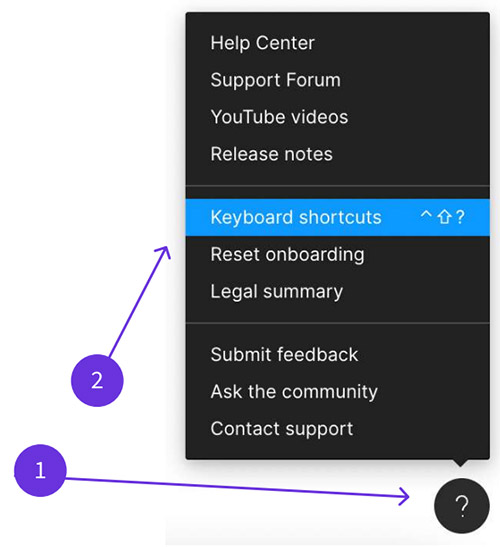
I’d also like to remind you that all keyboard shortcuts can be found right inside Figma. If you’ve forgotten a particular combination—or if you’re using Windows and the shortcut happens to be different—you can look it up directly within Figma by clicking the question mark icon in the bottom-right corner of the screen and selecting “Keyboard shortcuts.”