The Basics of JavaScript for Beginners: Everything You Need to Know When You First Start Learning the Language—Variables, Functions, and Much More.
Introduction
JavaScript is a programming language—or, in other words, a tool that a computer uses to receive instructions.
JavaScript is a lightweight, interpreted programming language. It is designed for creating web applications. It is free and integrated with Java. JavaScript is very easy to implement because it is integrated with HTML. It is an open-source, cross-platform programming language.
Just as, for example, cats control people by hissing and meowing, humans control computers using statements written in a programming language. All web browsers understand JavaScript, and you can use it to make web pages do crazy things!
It’s lightweight and is most often used as part of web pages, where it allows client-side scripts to interact with the user and create dynamic pages. It’s an interpreted programming language with object-oriented capabilities.
JavaScript started out as a way to make web pages more interactive. Today, JavaScript runs in more places than just web browsers—it runs on web servers, phones, and even in robotics! This guide will teach you some of the basics of JavaScript so you can get started quickly.
Just like cats, you’ll always land on your feet—even when programming! Unlike spilling a glass of water on your laptop, this guide won’t harm your computer in any way, even if you type a command incorrectly or click the wrong button.
Just like cats, computer programmers constantly make mistakes: they type incorrectly, forget quotation marks or parentheses, and forget how basic functions work. Programmers are more concerned with getting things to work in the end than with trying to get them to work the first time.
The best way to learn is to learn from your mistakes!
So don’t be a scaredy-cat! The worst that can happen is that you might have to refresh this page in your web browser if you get stuck. Don’t worry—that happens very rarely.
The Basics
JavaScript is currently running on this page. Let’s play around with it a bit. For simplicity’s sake, I’m assuming you’re using Google Chrome to read this page (if you aren’t, it might be easier for both of us if you switch to Chrome).
First, right-click anywhere on the screen and select “Inspect Element,” then switch to the “Console” tab. You should see something like this:
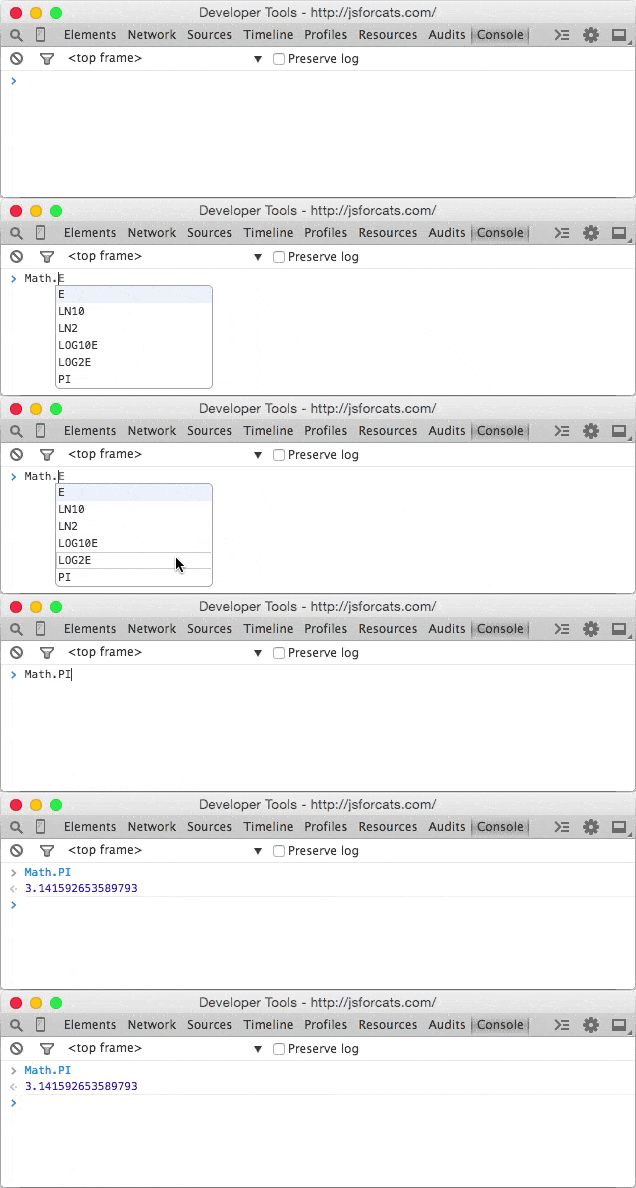
This is the console, also known as the “command line” or “terminal.” Essentially, it’s a way to enter one command at a time into the computer and get an immediate response. It’s a very useful learning tool (I still use the console almost every day when I write code).
The console does some pretty interesting things. Here, I’ve started typing something, and the console is helping me by giving me a list of all the possible suggestions I could continue typing! Another thing you can do is type 1 1 into the console, then press Enter and see what happens.
Using the console is a very important part of learning JavaScript. If you don’t know whether something works or what a command is for, go to the console and figure it out! There will be plenty of examples below.
Strings
Since I’m a cat, I want to replace every occurrence of the word dog on the Internet with those blasted dogs (those darn dogs).
First, open the console and type a few sentences that contain the word dog at least once. In JavaScript, a sequence of letters, numbers, words, or anything else is called a string. Strings must begin and end with a quote. It doesn’t matter whether it’s a single quote ' or double "— just make sure you use the same type of quotes at the beginning and end.
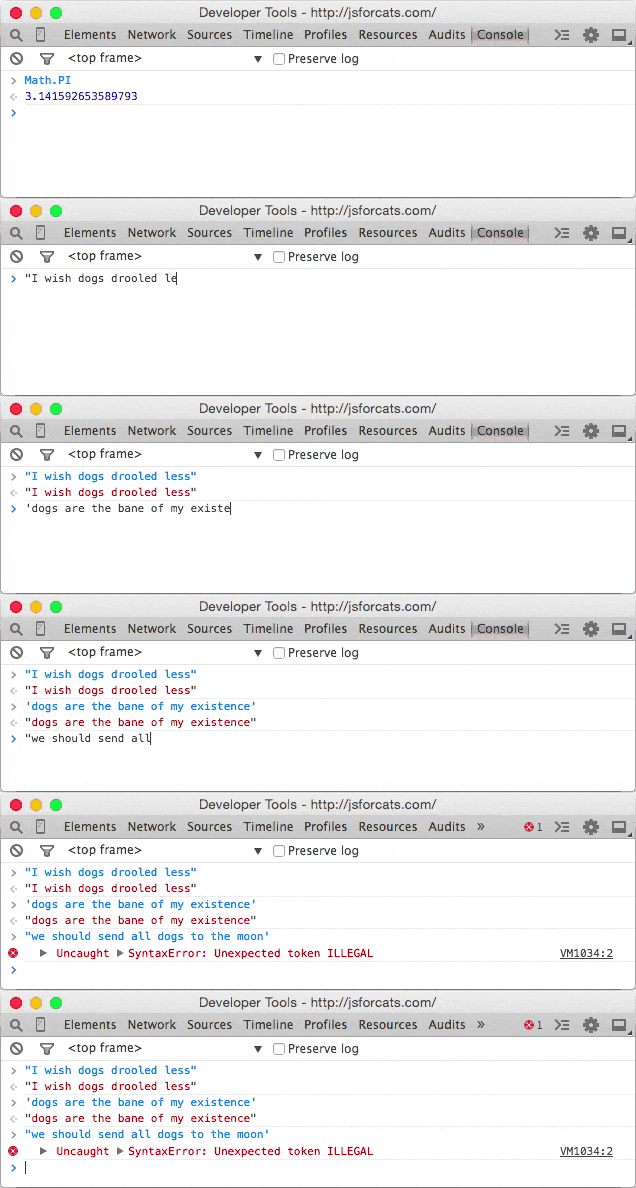
See that annoying error message above? Don’t worry—you haven’t broken any rules. SyntaxError ILLEGAL is the robots’ way of telling you that there’s a problem with your program. The first two sentences had the same type of quotation marks at the beginning and end, but when I mixed single and double quotation marks, an error appeared.
Okay, to fix one of these sentences (by replacing dog with our improved version), we first need to save the original sentence so we can call it later when we use the magic of replacement. Notice how the string is repeated in red when we enter it into the console? That’s because we didn’t tell it to store the sentence anywhere, so it just prints it back out (or returns an error if we messed something up).
Values and Variables
Values are the simplest components in JavaScript. 1 — a value, true — this is a value, hello — this is a value, function() {} — this is a value, and the list goes on! There are several different types of values in JavaScript, but we don’t need to go over them all right away—you’ll naturally learn about them as you code more!
To store values, we use things called variables. The word “variable” means “can change” and is used because variables can store many different types of values and can change their values many times. They’re very similar to mailboxes.
We put something into a variable—for example, our sentence—and then assign the variable an address that we can use to find the sentence later. In real life, mailboxes must have mailbox numbers, but in JavaScript, you usually just use lowercase letters or numbers without spaces.
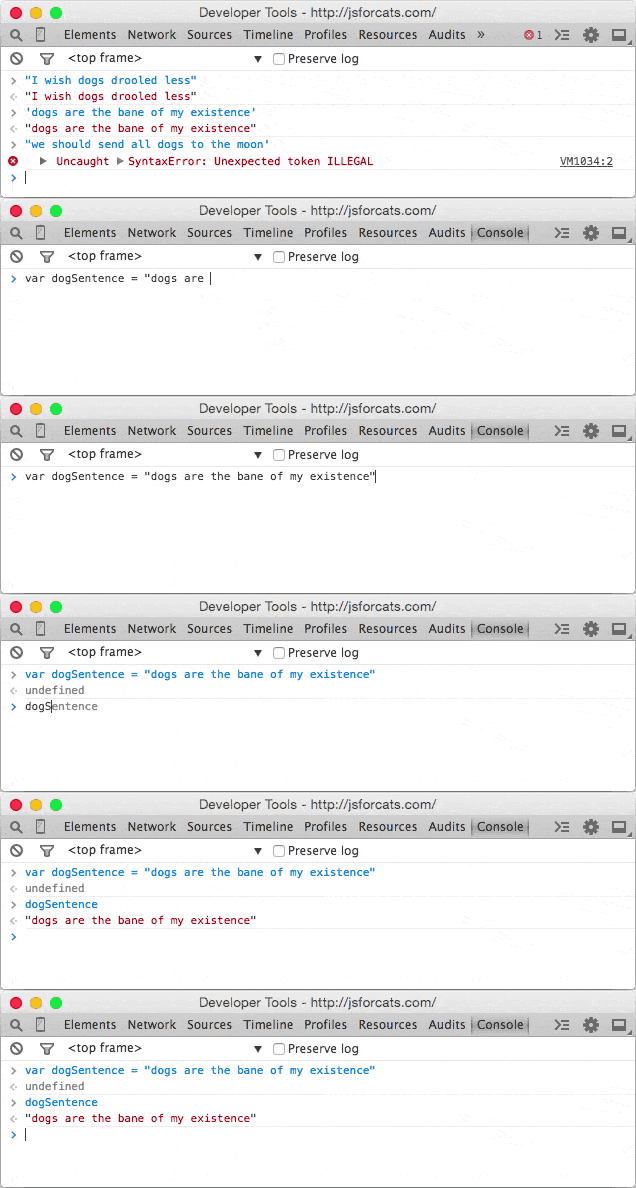
var — is short for the English word “variable,” and = means that the thing on the right side is stored in the thing on the left side. Also, as you can see now, when we store our sentence in a variable, the console doesn’t just immediately return our sentence, but instead gives us undefined, which means there’s nothing to return.
If you simply enter a variable name into the console, it will display the value stored in that variable. It’s also worth noting that, by default, variables disappear when you navigate to another page.
For example, if I clicked the “Refresh” button in Chrome, my variable dogSentence would be erased and would never exist again. But don’t worry about that for now—you can simply press the up or down arrows on your keyboard while in the console to view everything you’ve recently entered.
Converting a Decimal Number to an Integer
This is a pretty simple trick.
const number = 23.6565
console.log(number | 0);
Functions
Now that our statement is stored in a variable, let’s change the word stored in it! We can do this by calling a function. Functions are a type of value that, generally speaking, serve a specific purpose (goal or action) for us. Calling them “actions” would be strange, so we use the word “function” instead.
In JavaScript, there’s a function replacethat does exactly what we want! Functions take any number of values in parentheses (zero, one, or more) and return either undefinedor a modified string.
The function replace can be used with any strings and takes two arguments: the characters to output and the characters to swap. That sounds a bit confusing, so here’s a clear example:
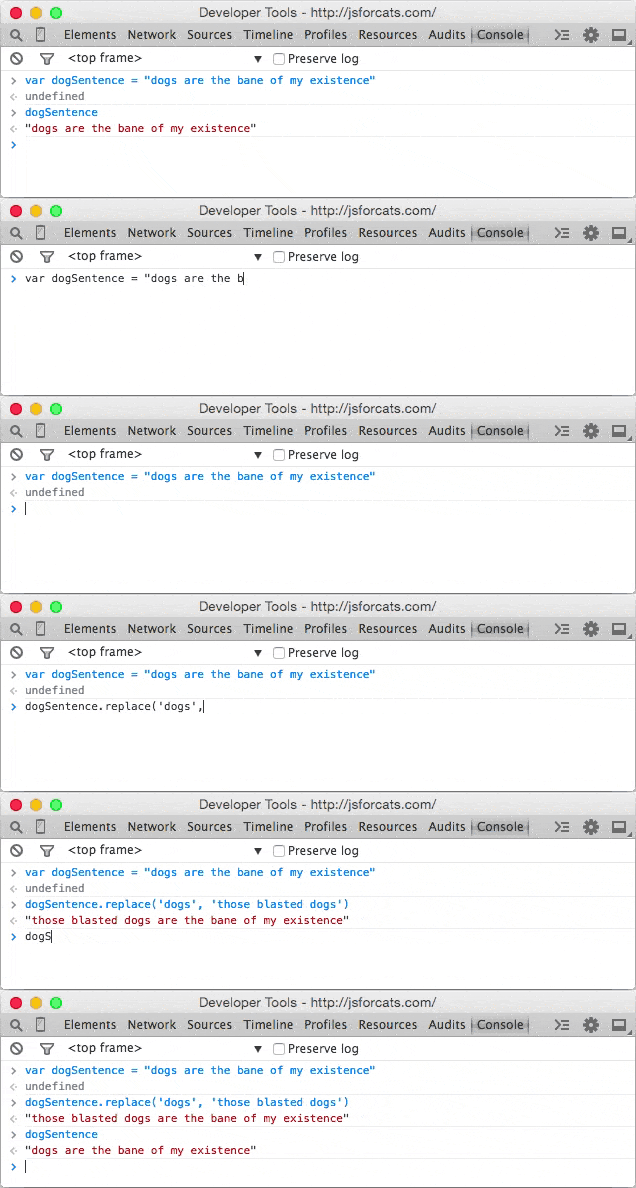
Note that the value dogSentence remains the same even after we run the command replace? This is because the function replace (and most JavaScript functions, for that matter) takes the value we pass to it and returns a new value without changing the value we passed. Since we didn’t save the result (there’s no =), it simply returns the value to our console.
“Standard Library”
You might be wondering what other functions are available in JavaScript.
The answer: a lot.
There are many built-in standard libraries that you can learn about on MDN (a site run by Mozilla that has a lot of useful information about web technologies). For example, here’s the MDN page on the JavaScript Math object.
Third-Party JavaScript
There’s also a lot of JavaScript code that isn’t built-in. Third-party JavaScript is usually called a “library” or “plugin.” One of my favorites is called Underscore.js. Let’s grab it and load it onto our page!
First, go to the Underscore website (http://underscorejs.org) and click the download link (I usually use the development versions because they’re easier to read, but the others provide the same basic functionality).
Next, copy all the code to your clipboard (you can use “Select All” from the Edit menu to select everything). Then paste it into the console and press Enter. Now your browser has a new variable: _.
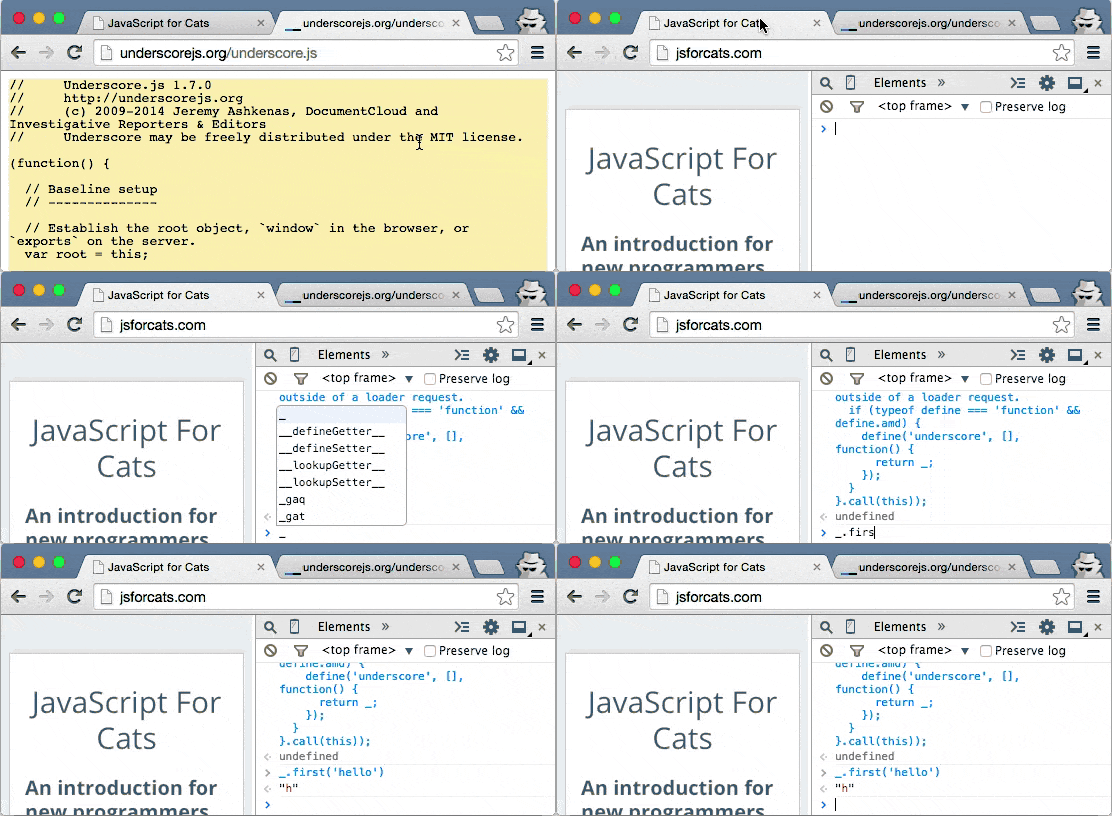
Underscores give you a ton of useful features. We’ll learn more about how to use them later.
Creating New Functions
You’re not limited to using other people’s functions—you can also write your own. It’s pretty simple! Let’s create a function makeMoreExcitingthat adds a few exclamation points to the end of a string.
function makeMoreExciting(string) {
  return string   '!!!!'
}
In other words, there’s a function that takes a string and returns a new copy of that string with several exclamation marks added to the end.
Here’s how we could write this manually in the console if we weren’t using a function:
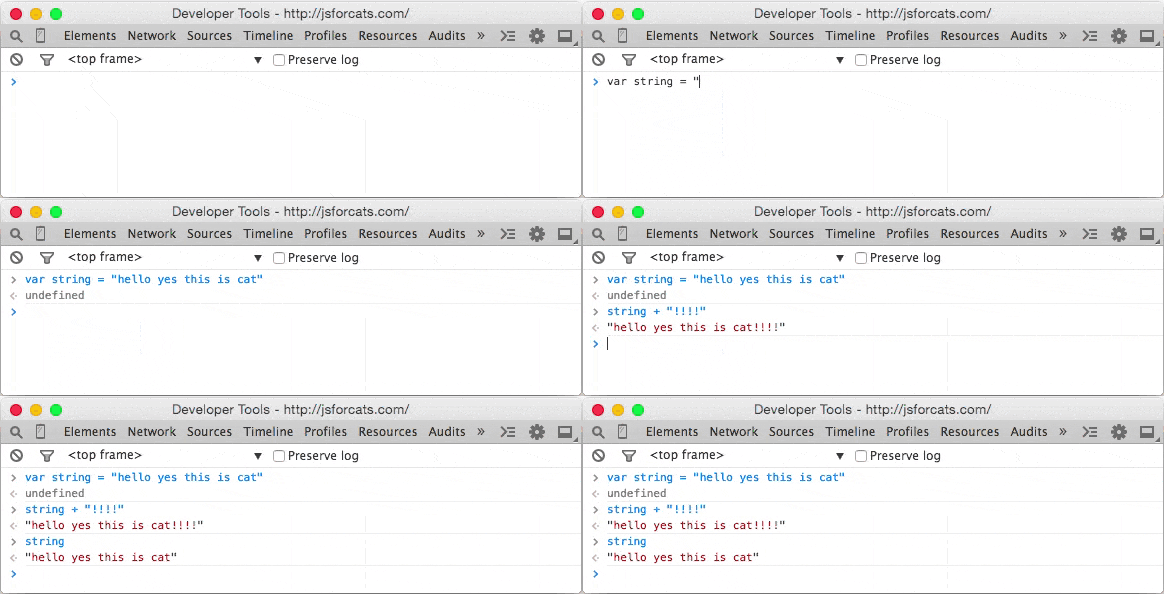
The expression string '!!!!' returns a new string, and our variable named string remains the same as before (since we didn’t update it using =.
Let’s use our function instead of doing this manually. First, paste the function into the console, and then call the function by passing a string:
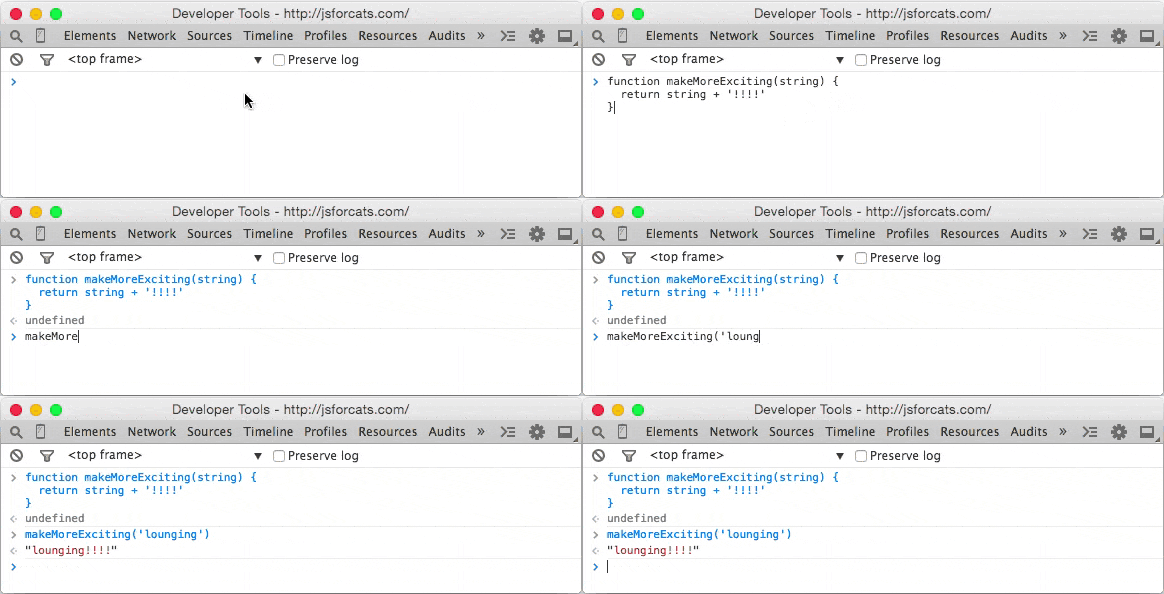
You can also call the same function by passing a variable that points to a string (in the example above, we simply entered the string directly as the value instead of first storing it in a variable):
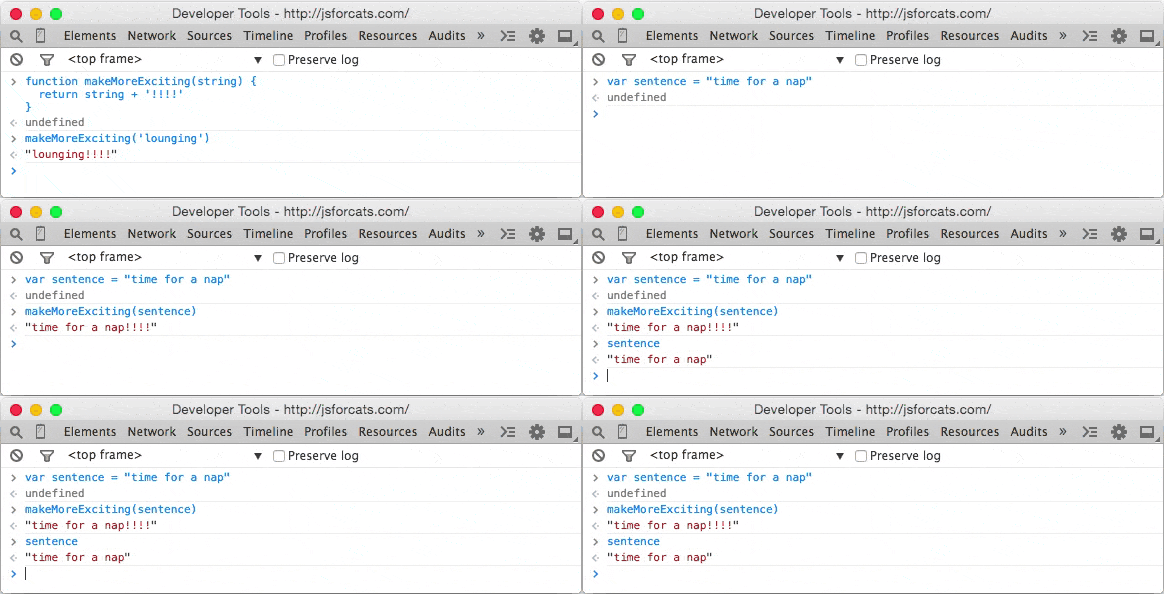
The string makeMoreExciting(выражение) is equivalent to выражение '!!!!'. What if we want to modify (or update) the value of the string in place? Just store the function’s return value back into our variable выражения:
var sentence = "time for a nap"
sentence = makeMoreExciting(sentence)
Now the string will have exclamation marks!
var only when initializing the variable—the first time you use it.After that, you should not use varunless you want to reinitialize the variable.
What will happen if we remove the statement return from our function?
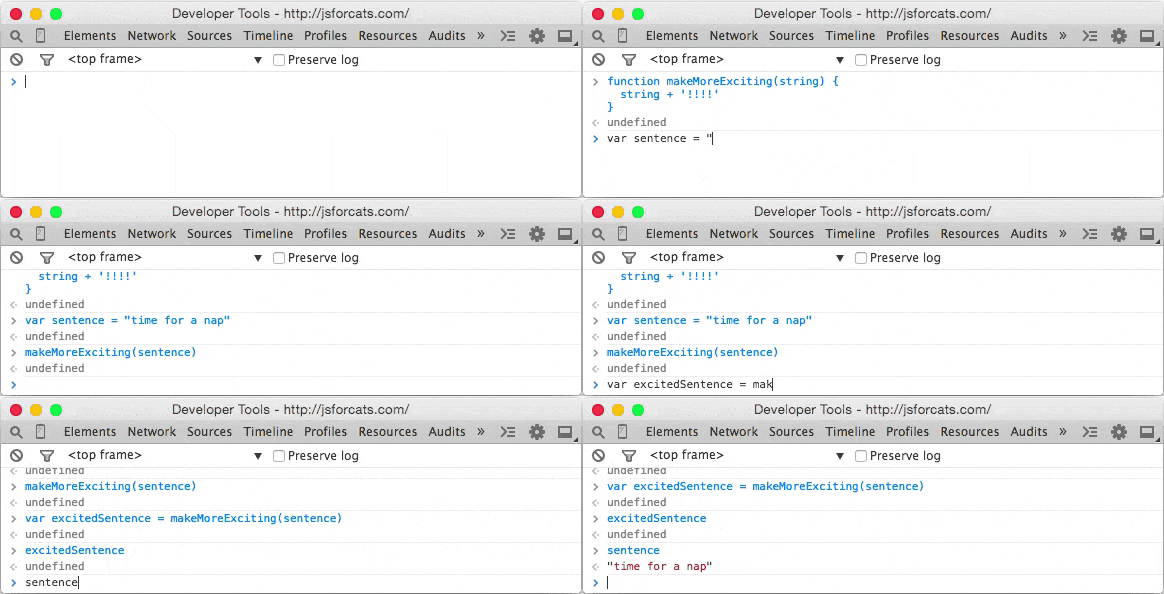
Why sentence is it empty? Because the function returns undefined by default!
You can return a value by writing return. Functions must accept a value, and if they modify that value or create a new one that is intended to be used later, they must return return a value (fun fact: the fancy term for this style is functional programming).
Here’s another function that doesn’t return anything but uses another method to show us the result:
function yellIt(string) {
  string = string.toUpperCase()
  string = makeMoreExciting(string)
  console.log(string)
}
This function yellIt uses our previous function makeMoreExciting, as well as a built-in method for strings (String) toUpperCase.
Methods are simply the name of a function when it belongs to something—in this case, toUpperCase — it’s a function that belongs to string, so we can refer to it as either a method or a function.
On the other hand, makeMoreExciting doesn’t belong to anything, so it would be technically incorrect to refer to it as a method (I know, it’s confusing).
The last line of the function is another built-in function that simply takes any values you provide and prints them to the console.
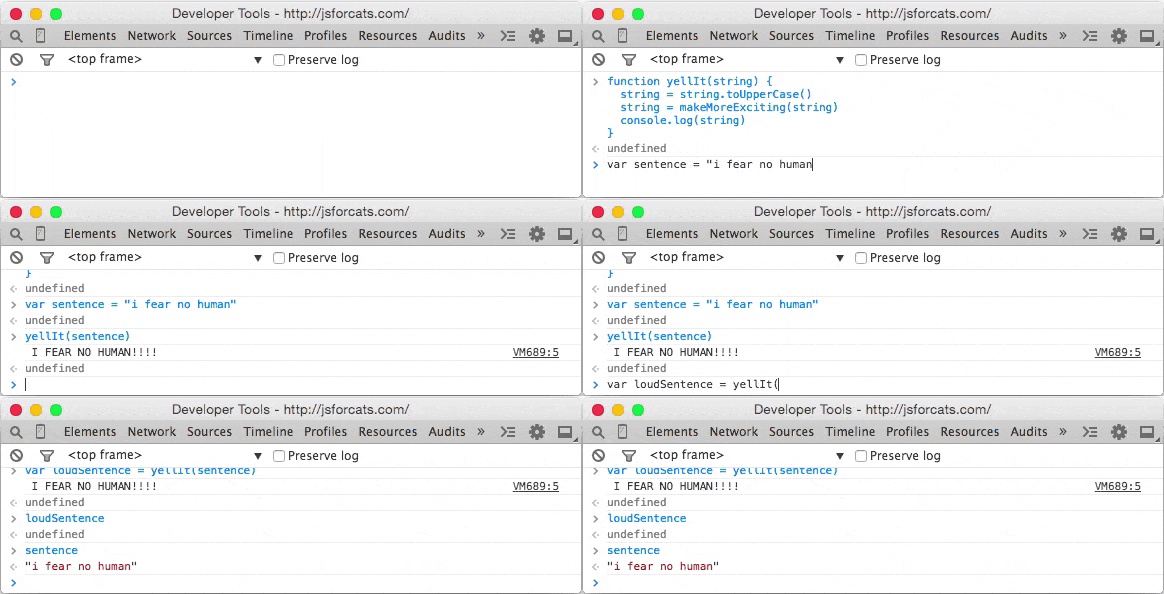
Is there something wrong with the function above yellIt? Here are the two main types of functions:
- functions that modify or create values and return them
- functions that take values and perform certain actions that cannot be returned
console.log is an example of the second type of function: it prints data to the console—an action you can see with your own eyes, but which cannot be represented as a JavaScript value.
My rule of thumb is to try to keep these two types of functions separate, so here’s how I would rewrite the function yellIt:
function yellIt(string) {
  string = string.toUpperCase()
  return makeMoreExciting(string)
}

console.log(yellIt("i fear no human"))
In this way, yellIt it becomes more general—that is, it performs only one or two simple tasks and knows nothing about printing itself to the console—that part can always be programmed later, outside the function definition.
Loops
Now that we have some basic skills, we can start being lazy. What?! Yes, that’s right. Programming is about being lazy. Larry Wall, the inventor of the Perl programming language, called laziness the most important virtue of a good programmer.
If computers didn’t exist, you’d have to do all those tedious tasks by hand, but if you learn to program, you can lie in the sun all day while a computer runs your programs for you somewhere. It’s a wonderful lifestyle, full of relaxation!
Loops are one of the most important ways to harness a computer’s power. Remember underscore.js?
Make sure it’s loaded on the page (remember: you can just press the up arrow on your keyboard a few times, then press Enterto reload it if you need to), and try copying and pasting this into the console:
function logANumber(someNumber) {
  console.log(someNumber)
}
_.times(10, logANumber)
This code uses one of the methods underscore called times, which takes 1 number and 1 function, and then, starting from 0 and going up to 10, adds 1, calling the function at each step.
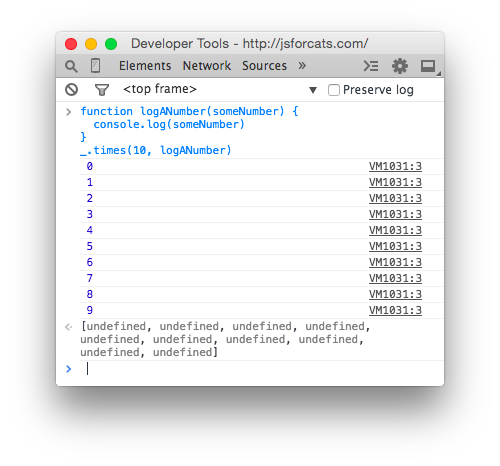
If we were to manually write out what times the code above does, it would look like this:
logANumber(0)
logANumber(1)
logANumber(2)
logANumber(3)
logANumber(4)
logANumber(5)
logANumber(6)
logANumber(7)
logANumber(8)
logANumber(9)
But cats refuse to do unnecessary manual work like this, so we should always ask ourselves, “Am I doing this in the laziest way possible?”
So why is this called a loop? Think of it this way: if we were to write a list of 10 numbers (from 0 to 9) using a JavaScript array, it would look like this:
var zeroThroughTen = [0, 1, 2, 3, 4, 5, 6, 7, 8, 9]What times — it goes through each number and repeats the task.
In the example above, the task was to call the function logANumber with the current number. Repeating a task in this way is called an array loop.
Arrays
I’ve mentioned this a few times, but let’s take a minute to learn about them. Imagine you need to keep track of all your friends.
Using an array would be a good solution. Think of an array as a sorted list where you can store many items.
Here’s how you create an array:
var myCatFriends = ["bill", "tabby", "ceiling"]Cool! Now you have a list of your friends.
The elements (that’s what you call an individual item in an array) stored in arrays start at and are numbered from 0. So, myCatFriends[0] returns bill, while myCatFriends[1] returns tabby and so on.
To print your friends to the console from your new array, you can simply access an element, for example, like this:
console.log(myCatFriends[0])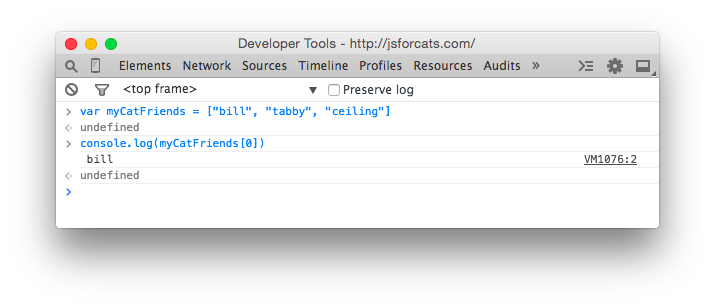
If you’ve made a new friend and want to add them to your list, it’s very simple: myCatFriends.push("super hip cat").
To check whether a new friend has been added to your array, you can use .length:
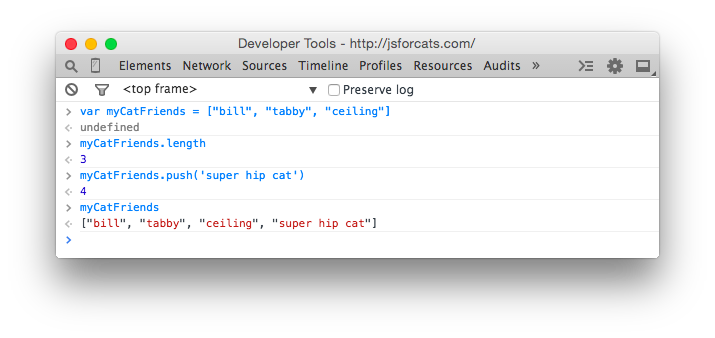
Notice how push it returned the length? That’s handy! Also note that arrays always preserve order, which means they’ll remember the order in which you added or defined items.
Not everything in JavaScript preserves order, so keep this special property of arrays in mind!
Removing Duplicates from an Array
This trick is pretty simple. Let’s say I have an array containing numbers, strings, and booleans. And I want to make sure there are no duplicate elements in this array. How do I do that?
const array = [1, 2, 3, 2, 1, true, true, false, 'Ratul', 1, 5];
const filtered__array = [...new Set(array)];
console.log(filtered__array) // [ 1, 2, 3, true, false, 'Ratul', 5 ]
Getting the Last Element of an Array
Let’s say you have an array. What do we do if we want to get the last element of this array?
const array = [1, 2, 3, 4, 5]
const last_Item = array.slice(-1)
console.log(last_Item)
If you set -2 instead of -1, you’ll get the last two values in the array; then, if you set -3 instead of -2, you’ll get the values of the last three indices, and so on.
Retrieving a random index value from an array
Suppose we’re holding a raffle. We have an array containing the names of the participants.
Now we want to randomly select just one user from the array as the winner.
const participants = ['Ratul', 'George', 'july', 'Padrik', 'G']
const winner = participants[Math.floor(Math.random() * participants.length)]
console.log(winner) // july
Finding the longest word in an array
Create an array and add several different strings to it. Now print the longest string in this array.
const array = ['Apple', 'Pine-apple', 'Banana', 'Jack-fruit']

let most_lengthy_string = ''
array.forEach((item) => {
  if (item.length > most_lengthy_string.length) {
    most_lengthy_string = item
  }
})
console.log(most_lengthy_string)
It’s a fairly simple approach. First, we have an array containing several strings. Then I created a variable containing an empty string.
Now, to find the longest string in this array, I need to check all the elements of the array.
If the length of an array element is greater than the length of our variable most_lengthy_string, we reassign the value of the variable, and finally, we print the found variable.
Here’s another option suggested by a site user for finding the longest word in an array:
const mostLengthy = someArray
    .reduce((acc, i) =>
        i.length > acc.length
             ? i
             : acc
)
Objects
Arrays are great for lists, but they can be difficult to work with for other tasks. Let’s look at our array of friends. What if you also want to store more than just names?
var myCatFriends = ["bill", "tabby", "ceiling"]
var lastNames = ["the cat", "cat", "cat"]
var addresses = ["The Alley", "Grandmas House", "Attic"]
Sometimes it’s helpful to have all the addresses or names in a single variable. In our example, for instance, we want to look up a friend’s address.
Arrays require a lot of work because you can’t just say, “Hey, array, give me Bill’s address,” since “Bill” is in one array and his address is in a completely different array.
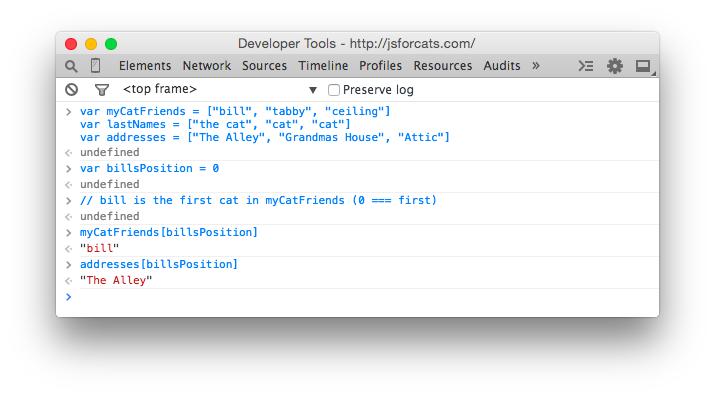
All of this is very unreliable because if our arrays change and we add a new friend to the beginning, we’ll also have to update our variable billsPositionto reflect Bill’s new location in the arrays!
Here’s an easier way to store information using objects:
var firstCat = { name: "bill", lastName: "the cat", address: "The Alley" }
var secondCat = { name: "tabby", lastName: "cat", address: "Grandmas House" }
var thirdCat = { name: "ceiling", lastName: "cat", address: "Attic" }
Why do we do this? Because now we have a variable for each friend that we can use to retrieve data in a more convenient and readable way.
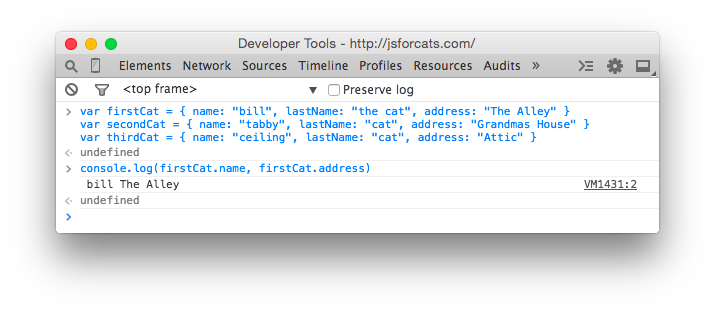
You can think of objects as keys on a keychain. Each one is meant for a specific door, and if you have nice labels on your keys, you can open doors very quickly.
In fact, on the left side of : — there are keys (or properties), and on the right — values. In English, these are “keys,” “properties,” and “values.”
// an object with a single key 'name' and single value 'bill'
{ name: 'bill' }
So why use arrays when you can just put your data into objects? Because objects don’t remember the order of the keys you’ve set. You can enter the following into an object:
{ date: "10/20/2012", diary: "slept a bit today", name: "Charles" }But the computer might return it like this:
{ diary: "slept a bit today", name: "Charles", date: "10/20/2012" }Or like this:
{ name: "Charles", diary: "slept a bit today", date: "10/20/2012" }Therefore, you can never trust the order of keys in objects.
If you want to do something really interesting, you can create an array filled with objects, or an object filled with arrays!
var moodLog = [
  {
    date: "10/20/2012",
    mood: "catnipped"
  },
  {
    date: "10/21/2012",
    mood: "nonplussed"
  },
  {
    date: "10/22/2012",
    mood: "purring"
  }
]

// ordered from least to most favorite
var favorites = {
  treats: ["bird sighting", "belly rub", "catnip"],
  napSpots: ["couch", "planter box", "human face"]
}
When you combine different things like this, you create data structures—just like Legos!
Callbacks
Callbacks (or reverse functions) aren’t actually a JavaScript feature, like Object (object) or Array (an array), but simply a specific way of using functions.
To understand why callbacks are useful, you first need to learn about asynchronous programming.
Asynchronous code, by definition, is code that isn’t written synchronously. Synchronous code is easy to understand and write. Here’s an example to illustrate:
var photo = download('http://foo-chan.com/images/sp.jpg')
uploadPhotoTweet(photo, '@maxogden')
This synchronous pseudocode downloads a charming photo of a cat, then uploads the photo to Twitter and sends it to @maxogden. Pretty simple!
This code is synchronous because, in order to upload the photo to Twitter, the download must be complete. This means that line 2 cannot execute until the task in line 1 is fully completed.
If we were to actually implement this pseudocode, we’d want to ensure that the upload is “blocked” until the download is complete, which would prevent any other JavaScript code from executing until it’s finished.
Then, when the download is complete, JavaScript execution would be unlocked, and line 2 would be executed.
Synchronous code is good for things that happen quickly, but terrible for things that require saving, loading, downloading, or unloading.
What if the server you’re downloading a photo from is slow, or the internet connection you’re using is slow, or the computer you’re running the code on has too many open YouTube tabs and is running slowly?
This means it could potentially take several minutes of waiting before line 2 starts running. Meanwhile, since all JavaScript on the page is blocked from running during the download, the web page freezes completely and stops responding until the download is complete.
You should avoid blocking execution at all costs, especially if it causes your program to freeze. Let’s assume the photo above takes one second to download.
To illustrate how long one second is for a modern computer, here’s a program that checks how many JavaScript tasks it can process in one second.
function measureLoopSpeed() {
  var count = 0
  function addOne() { count = count + 1 }

  // Date.now() returns a big number representing the number of
  // milliseconds that have elapsed since Jan 01 1970
  var now = Date.now()

  // Loop until Date.now() is 1000 milliseconds (1 second) or more into
  // the future from when we started looping. On each loop, call addOne
  while (Date.now() - now < 1000) addOne() // Finally it has been >= 1000ms, so let's print out our total count
  console.log(count)
}

measureLoopSpeed()
Copy and paste the code above into the JavaScript console, and after one second it should display a number. On my computer, I got 8527360approximately 8.5 million.
In one second, JavaScript can call the function addOne 8.5 million times! So, if you have synchronous code for downloading a photo, and it takes one second to load the photo, that means you’re potentially preventing 8.5 million operations from running while JavaScript execution is blocked.
Some languages have a function sleepthat blocks execution for a certain number of seconds. For example, here’s some code bashthat runs on Terminal.app on Mac OS that uses sleep.
When you run the command sleep 3 && echo 'done sleep now', it pauses for 3 seconds before outputting 'done sleep now'.
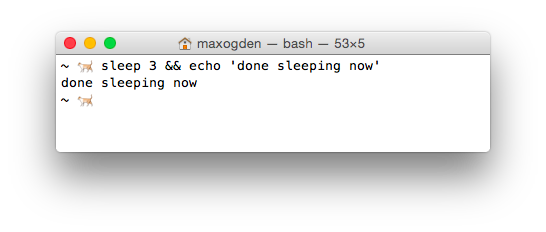
JavaScript does not have a sleep (sleep). You’re probably asking yourself, “Why am I learning a programming language that doesn’t support sleep?”
Instead of relying on sleep to wait for something to happen, JavaScript encourages the use of functions. If you need to wait for task A to finish before performing task B, you put all of task B’s code into a function and call that function only after A is complete.
For example, here’s the code in a blocking style:
a()
b()
And here’s the non-blocking version:
a(b)In the non-blocking version b it’s a callback a. In the blocking version, a both b both are called (they both have () after them, which immediately executes the function). In the non-blocking version, you’ll notice that only a is called, while b is simply passed as an argument.
In the blocking version, there is no explicit connection between a and b. In the non-blocking version, it becomes your job a to do what is needed and then call bwhen it’s done.
Using functions this way is called a callback, because your callback function, in this case b, is called later, once everything is complete.
Here is some pseudocode showing how a it might look like:
function a(done) {
  download('https://pbs.twimg.com/media/B4DDWBrCEAA8u4O.jpg:large', function doneDownloading(error, png) {
    // handle error if there was one
    if (err) console.log('uh-oh!', error)

    // call done when you are all done
    done()
  })
}
Recall our non-blocking example a(b), where we call a and pass b as the first argument. In the function definition for a over done our function bthat we pass. This behavior can be difficult to understand at first.
When you call the function a, the passed arguments will not have the same variable names once they are inside the function. In this case, what we call bis called done inside the function.
But b both done — these are simply variable names that refer to the same underlying function. Usually, callback functions are labeled with something like done or callbackto make it clear that they are functions that should be called during the execution of the current function.
Thus, as long as a performs its work and calls b upon completion, a and b they will be called in both the non-blocking and blocking versions.
The difference is that in the non-blocking version, we don’t need to pause JavaScript execution. In general, the non-blocking style is where you write each function so that it can return a value (return) as soon as possible, without any blocks.
If a takes one second and you’re using the blocking version, that means you can only perform one task.
If you use the non-blocking version (also called a callback or callback function), you can do literally millions of other things in that same second, which means you can finish your work millions of times faster and sleep for the rest of the day.
Remember: programming is all about being lazy, and you should be sleeping, not sitting at a computer.
I hope you now see that callback functions are simply functions that call other functions after some asynchronous task has completed.
Typical examples of asynchronous tasks include things like reading a photo, downloading a song, loading an image, interacting with a database, waiting for the user to press a key, and so on.
Anything that takes time. JavaScript handles asynchronous tasks like these really well if you take the time to learn how to use callbacks and prevent your JavaScript code from blocking execution.
Code Snippets
Short pieces of code (snippets) that help solve various tasks in JavaScript.
Checking if a function exists
Checking if a function exists before calling it.
It’s always frustrating when you get an error message while trying to call a function that hasn’t been defined, but there’s an easy way to prevent this. To check if a JavaScript function exists before calling it, try this snippet.
if (typeof yourFunctionName == 'function')
{
 yourFunctionName();
}
Replacing an Array Element
If we have an array and know the index of an element, we can replace its content with a simple assignment:
const items = ['a', 'b', 'c', 'd', 'e', 'f']
const i = 2

items[i] = '--NEW-ITEM--'

console.log(items)
//[ 'a', 'b', '--NEW-ITEM--', 'd', 'e', 'f' ]
If you don’t know the element’s index, you may first need to find the index of the array element.
Conclusion
This is just the beginning of your journey with JavaScript! You won’t be able to learn all of this at once, but you should find what works for you and try to grasp all the concepts.
I’d recommend coming back here tomorrow and going through it all again from the very beginning! It might take a few tries before you really get the hang of it (programming can be pretty tricky at first).
JavaScript is a dynamic programming language. It’s lightweight and is most often used as part of web pages, where it allows client-side scripts to interact with the user and create dynamic pages.
It is an interpreted programming language with object-oriented capabilities.
