A life hack involving email preheaders—or text previews—that you can use in every email.
Did you know there’s a trick for using preview text—or the preheader—to make the most of this valuable space in your emails?
Since the preview text in the “Inbox” contains at least as many characters as the email subject line (and in some cases even more), it can be difficult to optimize. This is because email clients always add enough characters to fill all the available space for the preview text (up to 5 lines).
This means you have two options:
- write a long preview, which may result in annoying truncation by email clients,
- or keep the text short so that URLs and other “unoptimized” content from your emails fill the entire space.
We’d like to suggest a little-known third option…
A Preheader Hack
Did you know that after the desired amount of preview text, you can create a blank space so that email clients don’t add other distracting text or characters to the preheader content?
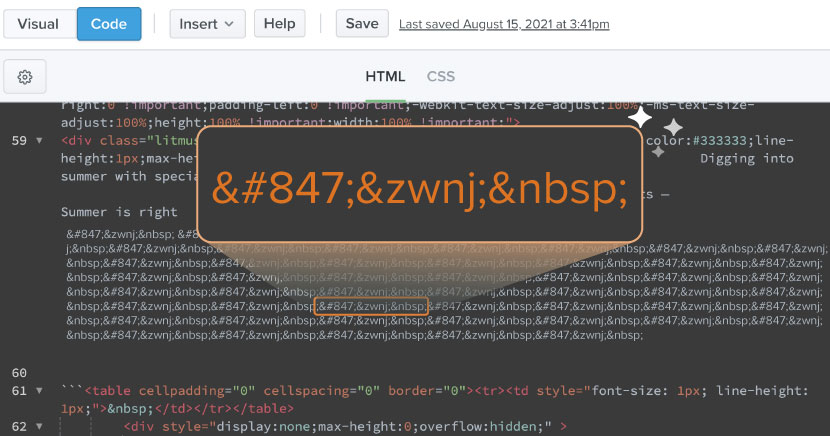
In most cases, all you need to do is add a string of zero-width non-joining characters (͏͏ and ‌) and non-breaking spaces ( ) after the preview text you want to display. Repeating ͏͏‌ fills any remaining space in the preview text.
However, there are some nuances here. In some cases, this preview hack may not work. Email clients are constantly changing (on average every 1.2 days), and it may not work everywhere.
Even if the text preview hack doesn’t work everywhere, that’s no reason to stop using it. It simply means that the text preview hack should be viewed as a progressive enhancement—a way to provide subscribers with a better experience if they have an email client that supports it—rather than as a hack that works everywhere.
Whether it’s due to an ESP or a bad day for the email client, in some cases you’ll have to tinker with the preview hack above to make sure it works.
Here are a few ways to do that:
1. Mark Robbins, in his Good Email Code library, offers a variant in which he alternates the HTML entity ͏͏ and a space as a preview hack:
͏ ͏ ͏ ͏ ͏ ͏ ͏ ͏ ͏ ͏We’ve also seen this done by adding spaces to the original hack:
͏ ‌ ͏ ‌ ͏ ‌ 3. To achieve the widest coverage, Mark Robbins recommends adding   and ­, since these HTML entities insert spaces that are still supported by Yahoo and iOS 16.4.
Bottom line: If the hack appears in the preview text, experiment with different variations and try to find one that works.
You can see where to insert the code in this example:
<div style="display: none; max-height: 0px; overflow: hidden;">
Insert hidden preheader text here.
</div>
<!-- Insert ͏‌ hack after hidden preview text -->
<div style="display: none; max-height: 0px; overflow: hidden;">
͏ ‌   ­ ͏ ‌   ­ ͏ ‌   ­ ͏ ‌   ­ ͏ ‌   ­ ͏ ‌   ­ ͏ ‌   ­ ͏ ‌   ­
</div>Background on the Preheader Hack
Previously, the preheader text consisted solely of the line ‌ , but the email community (and our recent testing) discovered that this preview text doesn’t work with Yahoo Mail. Our email marketing specialist, Karen Slater, recommends using all 5 HTML elements to “cover all bases and offer your subscribers the best experience, if supported.”
We’d also like to thank Litmus community member Ryan Field, who mentioned this technique back in 2016 and called it a “super-old” hack for preheader text. That may well be true, but it’s unlikely anyone has actually used it.
Nearly 35% of respondents to our LinkedIn survey are still unaware of this method.
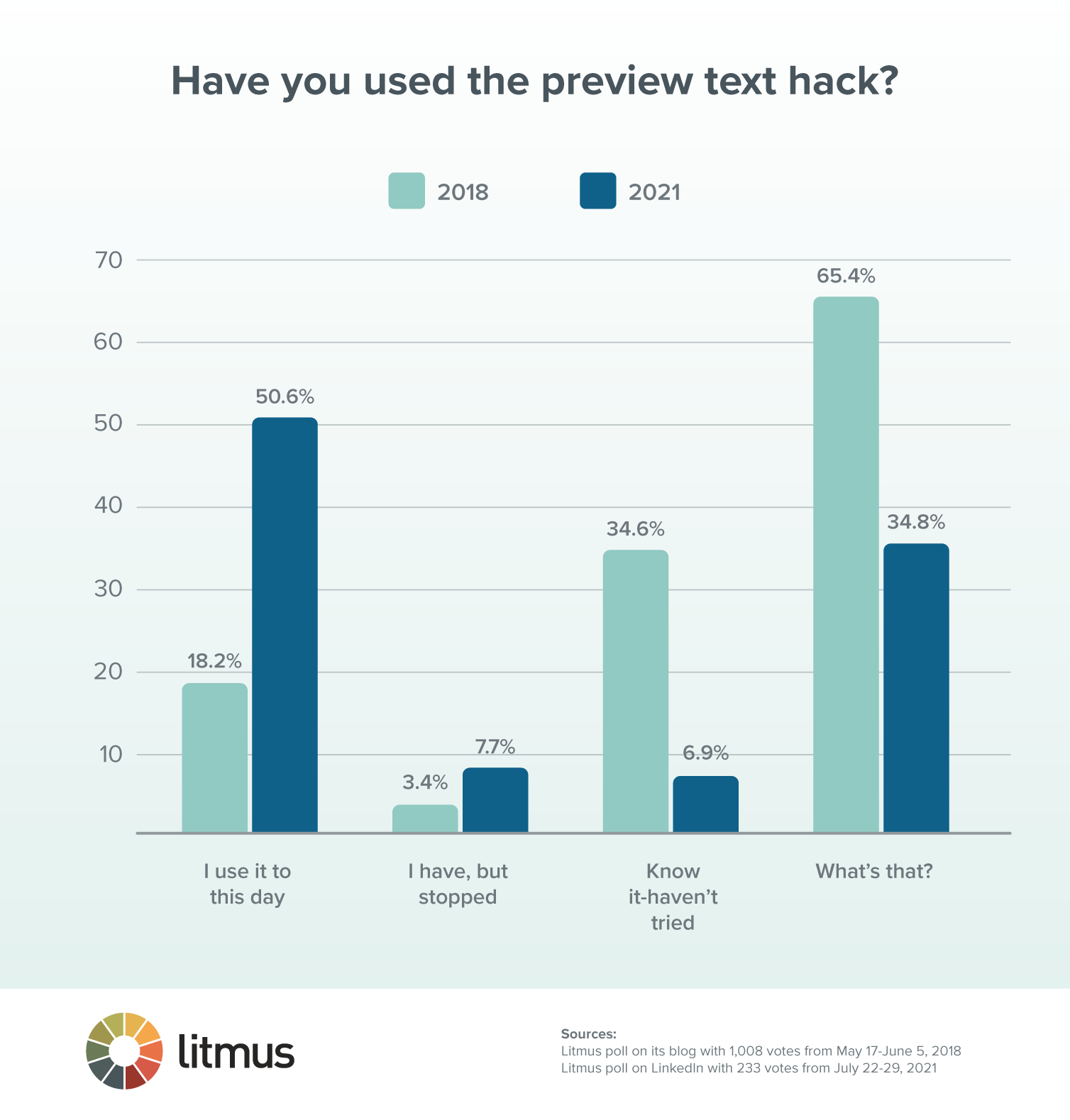
Let’s hope that the use of this preview text hack will only continue to grow.
How Brands Use This Hack
Looking for inspiration on how to use this trick?
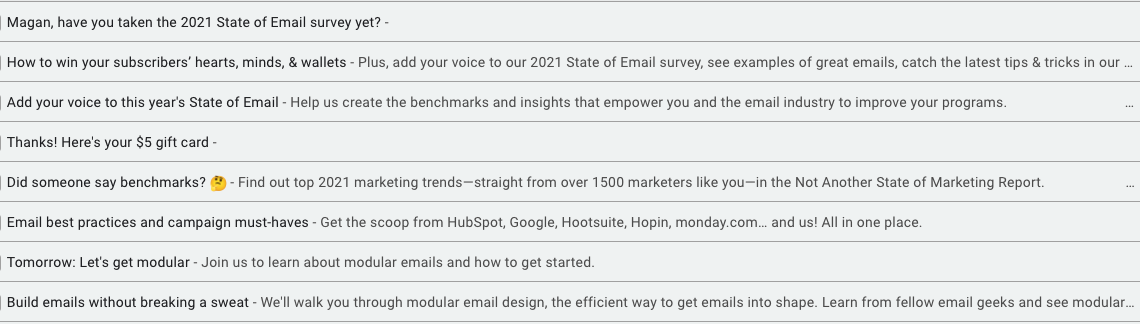
We use this technique in our Litmus emails, from our monthly newsletter and Litmus Weekly to product announcements and event invitations. Here’s what some of them look like in Gmail:
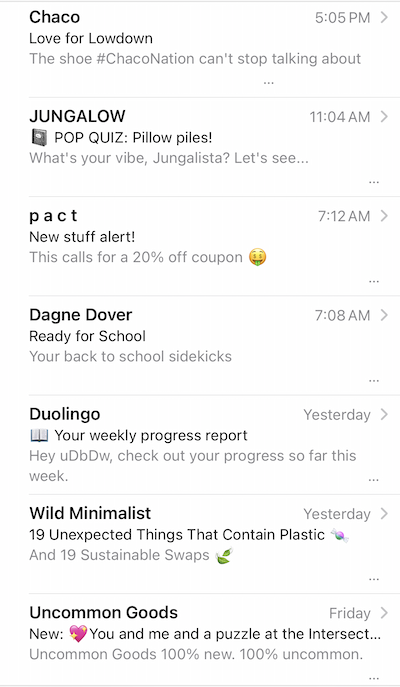
Check out a few more examples of how other brands are successfully using this hack to optimize their preview text:
Does this hack affect email deliverability?
Although there are concerns within the community and among email marketers about email deliverability when using this trick, we haven’t encountered any issues. We’ve been using the preview text hack in various campaigns for many years and have never noticed a negative impact on deliverability. In fact, it can actually help with deliverability, as it can create a positive experience for the subscriber, leading to engagement.
However, as with most other aspects of email, if you want to use this hack but are concerned about how it might affect email deliverability, — use A/B testing to see if your subscribers respond positively and to ensure that deliverability metrics remain stable.
This hack is growing in popularity, but there are still many brands that aren’t using it yet. So give it a try and see how it goes, but never leave your email subject line to chance—take control of your preheader text as well.
